mirror of
https://github.com/zhw2590582/ArtPlayer.git
synced 2026-10-14 00:06:17 -08:00

442 lines
9.9 KiB
Markdown
442 lines
9.9 KiB
Markdown
<div style="font-size:1.3rem;">
|
|
|
|
**Docup** is a single JavaScript file that fetches Markdown file and renders it as a beautiful one-page documentation.
|
|
|
|
Docup is built with Preact, the entire bundle (with CSS) is just 30kB minified and gzipped.
|
|
|
|
</div>
|
|
|
|
## Quick Start
|
|
|
|
Create an HTML file: `index.html` which will be be homepage of your documentation website:
|
|
|
|
```html
|
|
<!DOCTYPE html>
|
|
<html>
|
|
<head>
|
|
<meta charset="utf-8" />
|
|
<meta http-equiv="X-UA-Compatible" content="IE=edge" />
|
|
<meta
|
|
name="viewport"
|
|
content="width=device-width, initial-scale=1, maximum-scale=1, user-scalable=0"
|
|
/>
|
|
<title>My Awesome Doc</title>
|
|
<!-- Stylesheet -->
|
|
<link
|
|
rel="stylesheet"
|
|
href="https://unpkg.com/@egoist/docup@1/dist/docup.min.css"
|
|
/>
|
|
</head>
|
|
<body>
|
|
<!-- Script -->
|
|
<script src="https://unpkg.com/@egoist/docup@1/dist/docup.min.js"></script>
|
|
<!-- Start app -->
|
|
<script>
|
|
docup.init({
|
|
// ..options
|
|
})
|
|
</script>
|
|
</body>
|
|
</html>
|
|
```
|
|
|
|
Then populate a `README.md` file to the same directory where `index.html` is located.
|
|
|
|
```md
|
|
## Introduction
|
|
|
|
How about this.
|
|
|
|
## Advanced
|
|
|
|
How about that.
|
|
```
|
|
|
|
Finally serve this directory as a static website:
|
|
|
|
- **node.js**: `npm i -g static-server && static-server .`
|
|
- **deno**: `deno install --allow-net --allow-read https://deno.land/std/http/file_server.ts && file_server .`
|
|
- **python**: `python -m SimpleHTTPServer`
|
|
- ...etc, you can use any static file server, for real.
|
|
|
|
### How Files Are Resolved
|
|
|
|
If current `location.pathname` is `/`, i.e. the homepage, it fetches `/README.md`.
|
|
|
|
If current `location.pathname` is `/docs/`, it fetches `/docs/README.md`.
|
|
|
|
If current `location.pathname` is `/docs/en`, it fetches `/docs/en.md`.
|
|
|
|
Basically if the pathname ends with a slash, we treat it as a directory and try to load the `README.md` file under that path, you can also use [indexFile](#indexfile) option to change `README.md` to other file if you want. If the pathname does not end with slash, we would fetch `pathname + '.md'`.
|
|
|
|
You can also use [root](#root) option to set the origin of the files, for example if you want to load files from other domain, you can set `root: 'https://sub.domain.com/data'`.
|
|
|
|
## Guide
|
|
|
|
### Site Title
|
|
|
|
We use the value of `document.title` if it's not `undefined`, you can also set a title via options:
|
|
|
|
```js
|
|
docup.init({
|
|
title: 'My Website',
|
|
})
|
|
```
|
|
|
|
### Markdown Features
|
|
|
|
We use the blazing fast [marked](https://marked.js.org) to parse Markdown, all [GitHub Flavored Markdown](https://github.github.com/gfm/) features are supported.
|
|
|
|
### Message Blocks
|
|
|
|
To highlight some messages in your documentation, use the following format to write a `blockquote`:
|
|
|
|
```md
|
|
> [TYPE]: This is a very dangerous action!
|
|
```
|
|
|
|
Where `[TYPE]` can be:
|
|
|
|
- `Alert`
|
|
- `Warning`
|
|
- `Info`
|
|
- `Success`
|
|
- `Note`
|
|
|
|
And they look like:
|
|
|
|
> **Alert**: This is an alert!
|
|
|
|
> **Warning**: This is a warning!
|
|
|
|
> **Info**: This is a info!
|
|
|
|
> **Success**: This is a success!
|
|
|
|
> **Note**: This is just a note!
|
|
|
|
### Embedding
|
|
|
|
Embedding and running code snippets is easy if your provider supports iframe, like [codesandbox.io](https://codesandbox.io):
|
|
|
|
```html
|
|
<iframe
|
|
src="https://codesandbox.io/embed/vue"
|
|
style="width:100%; height:500px; border:0; border-radius: 4px; overflow:hidden;"
|
|
sandbox="allow-modals allow-forms allow-popups allow-scripts allow-same-origin"
|
|
>
|
|
</iframe>
|
|
```
|
|
|
|
### Highlight
|
|
|
|
Docup uses [Prism.js](http://prismjs.com/) to highlight code blocks, by default only a few languages are supported, namely: `html` `css` `js` `markdown` `bash` `json`, you can manually load Prism language components to support more languages, e.g. for Go programming language:
|
|
|
|
```js
|
|
docup.init({
|
|
highlightLanguages: ['go'],
|
|
})
|
|
```
|
|
|
|
Available languages:
|
|
|
|
```js preact
|
|
const { useState } = hooks
|
|
|
|
export default ({ langs }) => {
|
|
const [showAll, setShowAll] = useState(false)
|
|
return html`<div>
|
|
<ul>
|
|
${(showAll ? langs : langs.slice(0, 5)).map(
|
|
(lang) => html`<li key="{lang}">${lang}</li>`
|
|
)}
|
|
</ul>
|
|
<button
|
|
style="margin-top:20px;border:1px solid; font-size: 14px; padding:5px;"
|
|
onClick=${() => setShowAll(!showAll)}
|
|
>
|
|
Show ${showAll ? 'less' : 'all'}..
|
|
</button>
|
|
</div>`
|
|
}
|
|
```
|
|
|
|
### Inline Component
|
|
|
|
You can inline Preact components inside Markdown file like this:
|
|
|
|
````markdown
|
|
```js preact
|
|
const { useState } = hooks
|
|
|
|
export default () => {
|
|
const [count, setCount] = useState(0)
|
|
return html`<button
|
|
style="width:100px;background:#ccc;padding:5px"
|
|
onClick=${() => setCount(count + 1)}
|
|
>
|
|
${count}
|
|
</button>`
|
|
}
|
|
```
|
|
````
|
|
|
|
Write `preact` next to the language name and we will render the code as a Preact component in place:
|
|
|
|
```js preact
|
|
const { useState } = hooks
|
|
|
|
export default () => {
|
|
const [count, setCount] = useState(0)
|
|
return html`<button
|
|
style="width:100px;background:#ccc;padding:5px"
|
|
onClick=${() => setCount(count + 1)}
|
|
>
|
|
${count}
|
|
</button>`
|
|
}
|
|
```
|
|
|
|
> Warning: Note that you can't use JSX here, because it's not supported by browsers natively. But you can use the `html` function which is powered by [developit/htm](https://github.com/developit/htm).
|
|
|
|
### CSS Variables
|
|
|
|
```js preact
|
|
const { useEffect, useState } = hooks
|
|
|
|
// could pass in an array of specific stylesheets for optimization
|
|
function getAllCSSVariableNames(styleSheets = document.styleSheets) {
|
|
var cssVars = []
|
|
// loop each stylesheet
|
|
for (var i = 0; i < styleSheets.length; i++) {
|
|
// loop stylesheet's cssRules
|
|
try {
|
|
// try/catch used because 'hasOwnProperty' doesn't work
|
|
for (var j = 0; j < styleSheets[i].cssRules.length; j++) {
|
|
try {
|
|
// loop stylesheet's cssRules' style (property names)
|
|
for (var k = 0; k < styleSheets[i].cssRules[j].style.length; k++) {
|
|
let name = styleSheets[i].cssRules[j].style[k]
|
|
// test name for css variable signature and uniqueness
|
|
if (name.startsWith('--') && cssVars.indexOf(name) == -1) {
|
|
cssVars.push(name)
|
|
}
|
|
}
|
|
} catch (error) {}
|
|
}
|
|
} catch (error) {}
|
|
}
|
|
return cssVars
|
|
}
|
|
|
|
function getElementCSSVariables(allCSSVars, element = document.body, pseudo) {
|
|
var elStyles = window.getComputedStyle(element, pseudo)
|
|
var cssVars = {}
|
|
for (var i = 0; i < allCSSVars.length; i++) {
|
|
let key = allCSSVars[i]
|
|
let value = elStyles.getPropertyValue(key)
|
|
if (value) {
|
|
cssVars[key] = value.trim()
|
|
}
|
|
}
|
|
return cssVars
|
|
}
|
|
|
|
export default () => {
|
|
const vars = getElementCSSVariables(
|
|
getAllCSSVariableNames(),
|
|
document.documentElement
|
|
)
|
|
|
|
return html`
|
|
<ul>
|
|
${Object.keys(vars).map((name) => {
|
|
const value = vars[name]
|
|
return html`<li key=${name}>
|
|
<code style="display:inline-block;margin-right:10px;">${name}</code
|
|
>${/-(bg|fg)$/.test(name)
|
|
? html`<span
|
|
style=${{
|
|
background: value,
|
|
height: 15,
|
|
width: 15,
|
|
display: 'inline-block',
|
|
border: '1px solid #000',
|
|
}}
|
|
></span>`
|
|
: html`<code>${value}</code>`}
|
|
</li>`
|
|
})}
|
|
</ul>
|
|
`
|
|
}
|
|
```
|
|
|
|
### Multiple Pages
|
|
|
|
If your doc is too long to display in a single page, you can split it into multiple Markdown files, that works because Docup [fetches Markdown file based on the current `pathname`](#how-files-are-resolved).
|
|
|
|
Then all you need is to route all requests to the `index.html`. (Also known as SPA fallback)
|
|
|
|
If you host your docs on [Netlify](https://netlify.com), use following rule in `_redirects` file:
|
|
|
|
```
|
|
/* /index.html 301
|
|
```
|
|
|
|
Or if you're using [Vercel](https://vercel.com), use following config in `vercel.json`:
|
|
|
|
```json
|
|
{
|
|
"rewrites": [
|
|
{
|
|
"source": "/(.*)",
|
|
"destination": "/index.html"
|
|
}
|
|
]
|
|
}
|
|
```
|
|
|
|
Or Nginx config:
|
|
|
|
```nginx
|
|
location / {
|
|
try_files /index.html =404;
|
|
}
|
|
```
|
|
|
|
## Deploy
|
|
|
|
### GitHub Pages
|
|
|
|
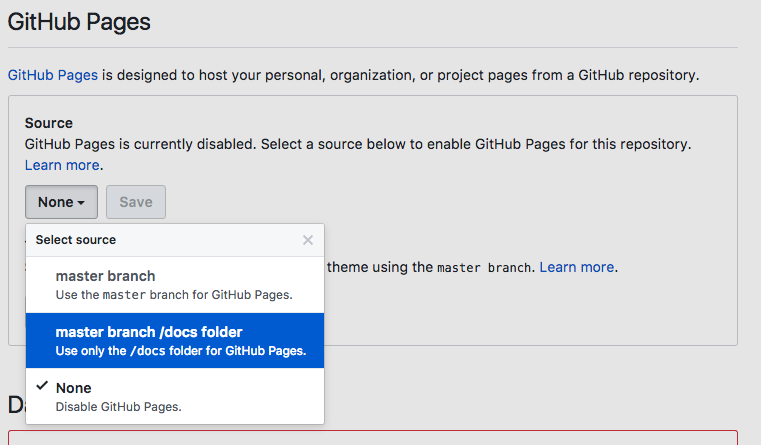
Simply put all your files in `docs` folder on `master` branch, or root directory on the `gh-pages` branch.
|
|
|
|
Then enable it on repo's `settings` page:
|
|
|
|
|
|
|
|
Don't forget to add `.nojekyll` file to tell GitHub to treat it as a normal static website.
|
|
|
|
### Netlify
|
|
|
|
Set the public directory to where your `index.html` is located at.
|
|
|
|
### Vercel
|
|
|
|
Set the public directory to where your `index.html` is located at.
|
|
|
|
## API
|
|
|
|
```js
|
|
docup.init(options)
|
|
```
|
|
|
|
### options
|
|
|
|
#### title
|
|
|
|
- Type: `string`
|
|
|
|
The title that is shown in the navbar. It defaults to `document.title`
|
|
|
|
<!-- #### logo
|
|
|
|
- Type: `string`
|
|
|
|
Using HTML string to display logo, e.g.:
|
|
|
|
```html
|
|
<img src="logo.svg" width="60" />
|
|
``` -->
|
|
|
|
#### navLinks
|
|
|
|
- Type: `NavLink[]`
|
|
|
|
Links in the navbar.
|
|
|
|
```ts
|
|
interface NavLink {
|
|
text: string
|
|
link: string
|
|
}
|
|
```
|
|
|
|
#### indexFile
|
|
|
|
- Type: `string`
|
|
- Default: `README.md`
|
|
|
|
Used for path ending with a slash.
|
|
|
|
#### base
|
|
|
|
- Type: `string`
|
|
- Default: `/`
|
|
|
|
The base path your website is located at. If you are serving your docs under a sub path like `https://user.github.io/awesome-project`, you need to set this option to `/awesome-project`.
|
|
|
|
#### root
|
|
|
|
- Type: `string`
|
|
- Default: `''`
|
|
|
|
The root path we use to resolve files from.
|
|
|
|
#### highlightLanguages
|
|
|
|
- Type: `string[]`
|
|
|
|
Extra languages to highlight.
|
|
|
|
#### font
|
|
|
|
- Type: `string`
|
|
- Default: `Lato`
|
|
|
|
Use a custom font from Google Fonts. We use [Lato](https://fonts.google.com/specimen/Lato) by default.
|
|
|
|
#### props
|
|
|
|
- Type: `any`
|
|
|
|
Inject props to inlined components.
|
|
|
|
For example:
|
|
|
|
```js
|
|
docup.init({
|
|
props: {
|
|
count: 0,
|
|
},
|
|
})
|
|
```
|
|
|
|
Then you can inline component and use props in Markdown:
|
|
|
|
````markdown
|
|
```js preact
|
|
export default ({ count }) => {
|
|
return html`<button>${count}</button>`
|
|
}
|
|
```
|
|
````
|
|
|
|
## Browser support
|
|
|
|
Last 2 versions of modern browsers.
|
|
|
|
## Resources
|
|
|
|
### Discord Chat
|
|
|
|
Join my [Discord Community](https://chat.egoist.sh).
|
|
|
|
### GitHub Sponsors
|
|
|
|
Support this project via [GitHub Sponsors](https://github.com/sponsors/egoist).
|
|
|
|
## License
|
|
|
|
MIT © EGOIST
|