
Docup is a single JavaScript file that fetches Markdown file and renders it as a beautiful one-page documentation.
Docup is built with Preact, the entire bundle (with CSS) is just 30kB minified and gzipped.
Quick Start
Create an HTML file: index.html which will be be homepage of your documentation website:
<!DOCTYPE html>
<html>
  <head>
    <meta charset="utf-8" />
    <meta http-equiv="X-UA-Compatible" content="IE=edge" />
    <meta
      name="viewport"
      content="width=device-width, initial-scale=1, maximum-scale=1, user-scalable=0"
    />
    <title>My Awesome Doc</title>
    <!-- Stylesheet -->
    <link
      rel="stylesheet"
      href="https://unpkg.com/@egoist/docup@1/dist/docup.min.css"
    />
  </head>
  <body>
    <!-- Script -->
    <script src="https://unpkg.com/@egoist/docup@1/dist/docup.min.js"></script>
    <!-- Start app -->
    <script>
      docup.init({
        // ..options
      })
    </script>
  </body>
</html>
Then populate a README.md file to the same directory where index.html is located.
## Introduction

How about this.

## Advanced

How about that.
Finally serve this directory as a static website:
- node.js:
npm i -g static-server && static-server . - deno:
deno install --allow-net --allow-read https://deno.land/std/http/file_server.ts && file_server . - python:
python -m SimpleHTTPServer - ...etc, you can use any static file server, for real.
How Files Are Resolved
If current location.pathname is /, i.e. the homepage, it fetches /README.md.
If current location.pathname is /docs/, it fetches /docs/README.md.
If current location.pathname is /docs/en, it fetches /docs/en.md.
Basically if the pathname ends with a slash, we treat it as a directory and try to load the README.md file under that path, you can also use indexFile option to change README.md to other file if you want. If the pathname does not end with slash, we would fetch pathname + '.md'.
You can also use root option to set the origin of the files, for example if you want to load files from other domain, you can set root: 'https://sub.domain.com/data'.
Guide
Site Title
We use the value of document.title if it's not undefined, you can also set a title via options:
docup.init({
  title: 'My Website',
})
Markdown Features
We use the blazing fast marked to parse Markdown, all GitHub Flavored Markdown features are supported.
Message Blocks
To highlight some messages in your documentation, use the following format to write a blockquote:
> [TYPE]: This is a very dangerous action!
Where [TYPE] can be:
AlertWarningInfoSuccessNote
And they look like:
Alert: This is an alert!
Warning
: This is a warning!
Info: This is a info!
Success: This is a success!
Note
: This is just a note!
Embedding
Embedding and running code snippets is easy if your provider supports iframe, like codesandbox.io:
<iframe
  src="https://codesandbox.io/embed/vue"
  style="width:100%; height:500px; border:0; border-radius: 4px; overflow:hidden;"
  sandbox="allow-modals allow-forms allow-popups allow-scripts allow-same-origin"
>
</iframe>
Highlight
Docup uses Prism.js to highlight code blocks, by default only a few languages are supported, namely: html css js markdown bash json, you can manually load Prism language components to support more languages, e.g. for Go programming language:
docup.init({
  highlightLanguages: ['go'],
})
Available languages:
const { useState } = hooks

export default ({ langs }) => {
  const [showAll, setShowAll] = useState(false)
  return html`<div>
    <ul>
      ${(showAll ? langs : langs.slice(0, 5)).map(
        (lang) => html`<li key="{lang}">${lang}</li>`
      )}
    </ul>
    <button
      style="margin-top:20px;border:1px solid; font-size: 14px; padding:5px;"
      onClick=${() => setShowAll(!showAll)}
    >
      Show ${showAll ? 'less' : 'all'}..
    </button>
  </div>`
}
Inline Component
You can inline Preact components inside Markdown file like this:
```js preact
const { useState } = hooks

export default () => {
  const [count, setCount] = useState(0)
  return html`<button
    style="width:100px;background:#ccc;padding:5px"
    onClick=${() => setCount(count + 1)}
  >
    ${count}
  </button>`
}
```
Write preact next to the language name and we will render the code as a Preact component in place:
const { useState } = hooks

export default () => {
  const [count, setCount] = useState(0)
  return html`<button
    style="width:100px;background:#ccc;padding:5px"
    onClick=${() => setCount(count + 1)}
  >
    ${count}
  </button>`
}
Warning: Note that you can't use JSX here, because it's not supported by browsers natively. But you can use the
htmlfunction which is powered by developit/htm.
CSS Variables
const { useEffect, useState } = hooks

// could pass in an array of specific stylesheets for optimization
function getAllCSSVariableNames(styleSheets = document.styleSheets) {
  var cssVars = []
  // loop each stylesheet
  for (var i = 0; i < styleSheets.length; i++) {
    // loop stylesheet's cssRules
    try {
      // try/catch used because 'hasOwnProperty' doesn't work
      for (var j = 0; j < styleSheets[i].cssRules.length; j++) {
        try {
          // loop stylesheet's cssRules' style (property names)
          for (var k = 0; k < styleSheets[i].cssRules[j].style.length; k++) {
            let name = styleSheets[i].cssRules[j].style[k]
            // test name for css variable signature and uniqueness
            if (name.startsWith('--') && cssVars.indexOf(name) == -1) {
              cssVars.push(name)
            }
          }
        } catch (error) {}
      }
    } catch (error) {}
  }
  return cssVars
}

function getElementCSSVariables(allCSSVars, element = document.body, pseudo) {
  var elStyles = window.getComputedStyle(element, pseudo)
  var cssVars = {}
  for (var i = 0; i < allCSSVars.length; i++) {
    let key = allCSSVars[i]
    let value = elStyles.getPropertyValue(key)
    if (value) {
      cssVars[key] = value.trim()
    }
  }
  return cssVars
}

export default () => {
  const vars = getElementCSSVariables(
    getAllCSSVariableNames(),
    document.documentElement
  )

  return html`
    <ul>
      ${Object.keys(vars).map((name) => {
        const value = vars[name]
        return html`<li key=${name}>
          <code style="display:inline-block;margin-right:10px;">${name}</code
          >${/-(bg|fg)$/.test(name)
            ? html`<span
                style=${{
                  background: value,
                  height: 15,
                  width: 15,
                  display: 'inline-block',
                  border: '1px solid #000',
                }}
              ></span>`
            : html`<code>${value}</code>`}
        </li>`
      })}
    </ul>
  `
}
Multiple Pages
If your doc is too long to display in a single page, you can split it into multiple Markdown files, that works because Docup fetches Markdown file based on the current pathname.
Then all you need is to route all requests to the index.html. (Also known as SPA fallback)
If you host your docs on Netlify, use following rule in _redirects file:
/* /index.html 301
Or if you're using Vercel, use following config in vercel.json:
{
  "rewrites": [
    {
      "source": "/(.*)",
      "destination": "/index.html"
    }
  ]
}
Or Nginx config:
location / {
    try_files /index.html =404;
}
Deploy
GitHub Pages
Simply put all your files in docs folder on master branch, or root directory on the gh-pages branch.
Then enable it on repo's settings page:
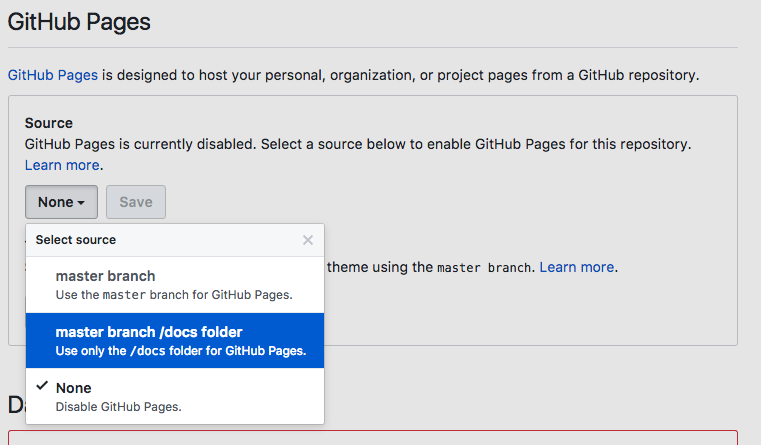
Don't forget to add .nojekyll file to tell GitHub to treat it as a normal static website.
Netlify
Set the public directory to where your index.html is located at.
Vercel
Set the public directory to where your index.html is located at.
API
docup.init(options)
options
title
- Type:
string
The title that is shown in the navbar. It defaults to document.title
navLinks
- Type:
NavLink[]
Links in the navbar.
interface NavLink {
  text: string
  link: string
}
indexFile
- Type:
string - Default:
README.md
Used for path ending with a slash.
base
- Type:
string - Default:
/
The base path your website is located at. If you are serving your docs under a sub path like https://user.github.io/awesome-project, you need to set this option to /awesome-project.
root
- Type:
string - Default:
''
The root path we use to resolve files from.
highlightLanguages
- Type:
string[]
Extra languages to highlight.
font
- Type:
string - Default:
Lato
Use a custom font from Google Fonts. We use Lato by default.
props
- Type:
any
Inject props to inlined components.
For example:
docup.init({
  props: {
    count: 0,
  },
})
Then you can inline component and use props in Markdown:
```js preact
export default ({ count }) => {
  return html`<button>${count}</button>`
}
```
Browser support
Last 2 versions of modern browsers.
Resources
Discord Chat
Join my Discord Community.
GitHub Sponsors
Support this project via GitHub Sponsors.
License
MIT © EGOIST